Grocery List App - rShopping
- 4.5
- Rating
- 100.00K
- Installs
- Free
- Price

 Analysis by App-foxy
I like shopping-list apps when they remove a small but persistent source of stress: trying to remember what is already at home while walking through a busy store. Grocery List App - rShopping takes that straightforward idea and keeps its focus on local shopping. I found it most useful as a simple preparation tool rather than as a full grocery-planning platform, and that distinction matters before you decide whether it belongs on your phone.
This is a free shopping app from ((RayDar)) Connected, available for Everyone and compatible with Android 8.0 or later. It has been around since Jun 1, 2010, and the current release is version 2.6.25. Its average rating is 4.5 from around 1.6K ratings, while the app has passed 100K installs. Those figures suggest a product with a settled purpose and a real user base, although popularity alone does not tell you whether its workflow matches your habits.
Getting past the first points of friction
The first thing I would clarify is what this app is trying to replace. It is closer to a focused digital note for shopping than to a supermarket marketplace, coupon service, meal-planning suite, or delivery app. That narrow role is a strength if you want to record items quickly and consult them while visiting local stores. It becomes a limitation if you expect automatic recipes, product comparisons, online checkout, or a large database of store-specific prices.
You May Also Like

 AccuWeather: Weather Radar
AccuWeather Review: A Quick, Clear Forecast for Everyday Decisions
For everyday plans, the best forecast is the one you can understand quickly. AccuWeather makes rain timing, radar, and local conditions easy to act on, with a few trade-offs.

 Hill Climb Racing
Why Hill Climb Racing Still Turns Crashes Into One More Run
A tiny car, a bumpy hill and one more upgrade: Hill Climb Racing keeps resurfacing because its simple chaos makes every near-miss feel personal.

 AliExpress - Shopping App
AliExpress Makes Global Shopping Feel Personal, but Shoppers Bear the Risk
AliExpress turns a global marketplace into a pocket-sized discovery engine. Its reach is useful, its shopping loop compelling, and its trade-offs easy to miss.

 Lords Mobile: Kingdom Wars
Lords Mobile Is a Kingdom-Building Routine, Not a Quick Match
A case-by-case verdict on the building, battles, device demands, and social commitments that make Lords Mobile rewarding for some players and exhausting for others.

 PDF Scanner app - TapScanner
TapScanner Makes Paperwork Easier to Capture, Check, and Share
TapScanner makes scanning with a phone feel less like a rescue operation and more like a dependable step in getting work done. Its capture tools are useful, though not flawless.

 Block Blast!
Block Blast! Shows How Much a Puzzle Game Can Leave Out
A quiet grid game shows why puzzle players increasingly value instant clarity, repeatable skill and low-pressure play—and where the genre still needs to catch up.
More From Our News Desk
View All News


Many people get stuck with list apps because they begin by trying to build a perfect system. I had better results treating rShopping as a quick capture tool. I would add an item as soon as I noticed it was running low, then use the list as a reminder before leaving. That approach avoids turning a five-minute planning task into another household project.
The practical question is whether the app lets you think in shopping terms. A useful list should reduce the number of decisions made in the aisle. Before opening it, decide whether you are preparing for one trip, keeping a running household list, or sharing responsibility with someone else. The first two uses fit a focused shopping-list app naturally. The last may require more care, because a basic list is not automatically the same thing as a synchronized family planner.
What to check before relying on it
After installing, I recommend making a small test list rather than immediately entering an entire month of groceries. Add a few ordinary items, close and reopen the app, and confirm that the entries remain easy to identify. Then mark or remove a test item using the normal controls. This simple check tells you whether the interaction feels comfortable before you depend on it during a rushed trip.
That test is especially worthwhile on an older phone or after moving to a new device. The minimum operating-system requirement is Android 8.0, so compatibility is reasonably broad, but compatibility does not guarantee that every phone feels equally responsive. Screen size, keyboard behavior, battery-saving settings, and the phone’s available storage can all affect an otherwise simple app.
I also suggest checking the keyboard and autocorrect while entering several items. Grocery names are often short, but mistakes can still create duplicate entries or make a list harder to scan. If you regularly buy a particular brand or unusual ingredient, type it in the same way each time. Consistent wording makes a running list easier to review than a collection of near-duplicates.
The app is free to install, with in-app purchases listed from $0.99 to $1.49 per item. I would look at any purchase prompt carefully and decide whether the basic workflow already covers your needs before paying for anything. A small optional purchase can be reasonable when it removes a genuine annoyance, but it should not be necessary to justify downloading a list app in the first place.
A setup routine that prevents messy lists
My preferred setup is deliberately plain. I create the list before shopping, add only what I expect to buy, and avoid entering vague reminders such as “something for dinner.” Specific entries are faster to verify. “Rice,” “dish soap,” or “plain yogurt” gives me a clear stopping point; a broad note invites more thinking in the store.
For a household list, I would agree on a naming style with anyone else who adds items. Decide whether you write quantities, sizes, or preferred varieties. This is not an advanced feature; it is a small habit that prevents confusion. If one person writes “coffee” and another writes a detailed brand and size, the list can become harder to interpret than a paper note.
There is also a useful trade-off between a short list and a complete one. A short list is easier to scan on a phone and works well for a quick local trip. A longer list may be more efficient for a weekly shop, but only if you review it before leaving and remove items that are no longer needed. rShopping is most helpful when the list reflects a real decision, not every possibility you might buy.
For recurring shopping, I would use the app as a memory aid rather than assuming it will organize the entire household automatically. Keep frequently purchased items written consistently, and do a cleanup after the trip. Removing completed entries immediately can keep future lists focused, while leaving them in place may be useful if you intentionally maintain a standing checklist. The right choice depends on whether you prefer a fresh list or a reusable routine.
Recovering when a shopping trip goes off plan
A realistic grocery trip rarely follows the original list exactly. An item may be unavailable, you may find a substitute, or you may decide to postpone a purchase. The best way to recover is to make one clear change at a time. Update the relevant entry, then continue shopping instead of repeatedly rebuilding the whole list around a single missing product.
If the list suddenly appears incomplete, first check the obvious possibilities: whether you opened the intended list, whether an item was marked as completed, and whether a filter or display state is hiding something. These are safer first steps than uninstalling the app or clearing its storage. Destructive troubleshooting can remove information that was only temporarily difficult to see.
If an entry seems to have disappeared after editing, recreate one test item and observe the same action again. This helps separate a one-off tap from a repeatable issue. On a touchscreen, accidental taps are easy when carrying a basket or using the phone one-handed. I found that slowing down for the final confirmation is often more useful than blaming the application immediately.
When the phone becomes sluggish, close other demanding apps and try again after the shopping rush. A basic list should not require elaborate maintenance, but the device hosting it still matters. Low free storage, an overloaded system, or an unstable keyboard can make text entry feel like an app problem even when the list itself is intact.
Handling a list during a busy store visit
At the store, I would group my attention by the route I normally take rather than constantly rearranging the list. If the app does not match the store’s layout, a quick pre-trip review can still help: read the complete list once, remember the unusual items, and then use the phone for confirmation instead of planning every step in real time.
This is one of the less obvious strengths of a focused list. It does not demand that you build a complex catalog before it becomes useful. A parent shopping with limited time, a student buying supplies for a shared kitchen, or someone visiting several local stores can start with a small list and gain value immediately. The trade-off is that the app may feel too bare if you want detailed organization by aisle, recipe, budget, or nutrition.
For a weekly household example, I might add staples during the week, review the entries on the morning of the trip, and remove anything already purchased elsewhere. At the store, I would use the phone only to verify what remains. That workflow avoids the common mistake of treating every old entry as an urgent purchase and makes the list a record of decisions rather than a permanent backlog.
If you shop with another person, agree on who is responsible for updating the list. A shared verbal plan such as “I will handle dairy and you handle cleaning supplies” can prevent two people from buying the same thing, but the app itself should not be assumed to coordinate people unless its available workflow clearly supports that. For a single shopper, this is not a concern; for a family, it is an important boundary.
When the app is not the cause
Not every missing item or failed update points to rShopping. A phone can lose input because the keyboard is misbehaving, a screen protector can reduce touch accuracy, or a background system restriction can interrupt an app. Before reinstalling, test whether other apps accept text and taps normally. If they do not, the broader device environment is the more likely place to investigate.
Storage is another practical check. If the phone is nearly full, everyday operations can become unreliable, including saving or refreshing information. Freeing a little space, restarting the device, and reopening the app are sensible general steps. I would only consider more disruptive actions after confirming that the problem happens repeatedly and affects more than one simple test.
It is also easy to confuse a shopping decision with a technical failure. If a product is unavailable at the store, the app cannot know that from a plain list. If a substitute no longer fits the budget or recipe, that is a planning issue rather than a display issue. The app records what you chose to remember; it does not replace checking shelves, prices, stock, or product labels.
This distinction explains why I would not choose rShopping as my only tool for complicated grocery management. Someone tracking dietary restrictions, comparing prices across stores, planning meals from recipes, or coordinating a large shared household may be better served by a more specialized service. Those alternatives can offer deeper organization, while rShopping is more appealing when speed and low mental overhead matter more than extensive features.
How it compares with paper notes and larger shopping platforms
Compared with paper, the app is easier to carry and revise, and a phone list is less likely to be left on the kitchen counter. Paper still has advantages: it is instantly visible, requires no battery, and can be passed between shoppers without explaining an interface. If your list is only two items long, paper may honestly be faster.
Compared with a general notes app, a dedicated shopping tool gives the task a clearer home. That separation can prevent grocery reminders from disappearing among work notes, screenshots, and personal lists. On the other hand, a general notes app may be better if you need long instructions, recipe details, or a shared document alongside the shopping items.
Compared with grocery delivery and supermarket apps, rShopping is less ambitious but potentially less distracting. Marketplace apps are useful when you want to browse inventory, place an order, or arrange delivery. They can also pull attention toward promotions and product pages. A focused local-shopping list is preferable when you already know what you need and intend to walk into a store yourself.
The main comparison is therefore not about which app has the most features. It is about whether you want a lightweight reminder or a complete shopping ecosystem. rShopping makes more sense for the former. If you expect live inventory, automatic price tracking, nutritional analysis, recipe conversion, or robust collaboration, choose a tool built around those jobs instead.
Who will get the most from it
I would recommend this app to people who repeatedly forget small household purchases, prefer local stores, and want a dedicated place for a running list without committing to a large planning system. It is also a sensible fit for users with older Android phones that meet the operating-system requirement and for anyone who values a free starting point.
It is less suitable for someone who wants a polished meal planner, a shared family command center, or a store-specific ordering experience. It may also disappoint users who enjoy detailed categorization and automation. A simple design can be calming, but simplicity becomes a weakness when your shopping process depends on many layers of information.
The age rating of Everyone makes it broadly approachable, and the long availability of the project gives it a familiar, established feel. Still, I would judge it by your own routine rather than by its history or rating. Install it, make a small test list, try the complete cycle from adding to finishing an item, and then decide whether the interaction is quicker than your current method.
My practical verdict is positive with clear limits. Grocery List App - rShopping is a useful, focused companion for remembering purchases at local stores, especially when you want to avoid the clutter of a general notes app. I like its narrow purpose and free entry point, but I would not mistake it for a full grocery-management platform. Choose it when a quick, dependable list is the problem you are solving; choose something else when planning, collaboration, prices, or delivery are equally important.
FAQs for Grocery List App - rShopping
01What is Grocery List App - rShopping used for?
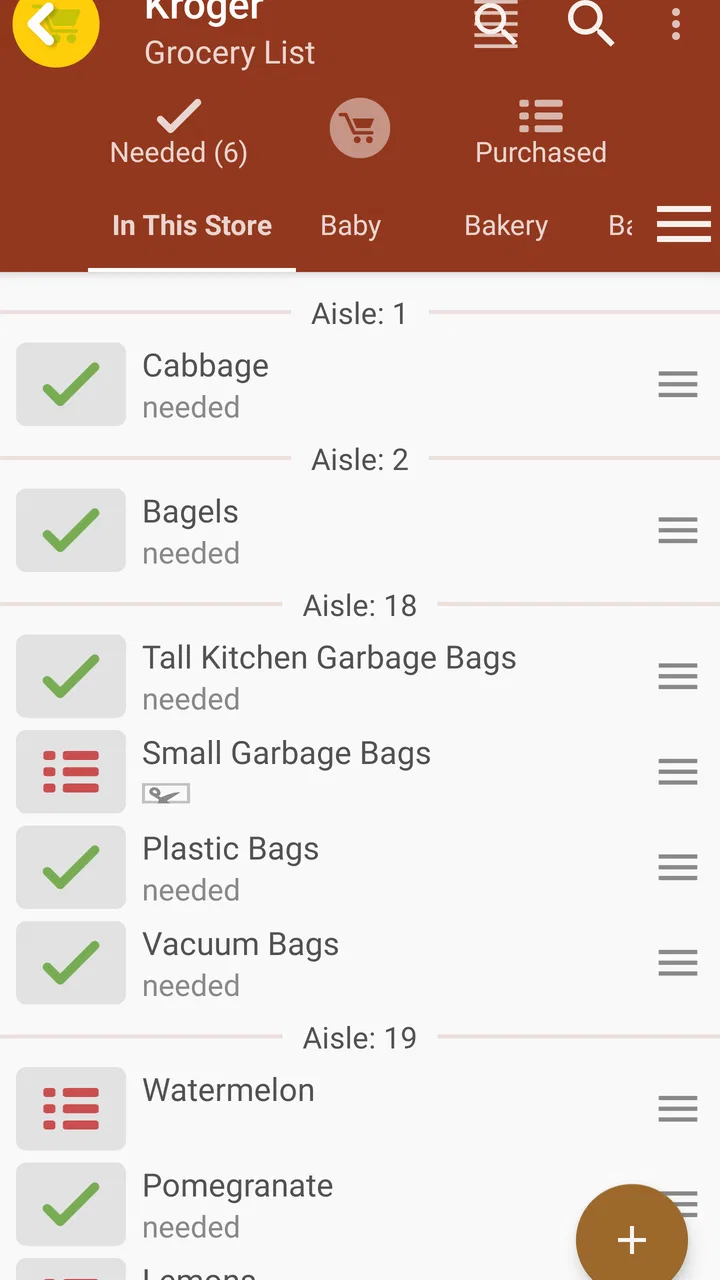
Grocery List App - rShopping is designed to help you organize shopping trips in a simple, practical way. You can create grocery lists, add products, edit quantities, and mark items as purchased while shopping. It is useful for planning weekly supermarket visits, remembering household essentials, and reducing the chance of buying unnecessary or duplicate products.
02Can I create and manage multiple shopping lists?
Yes, the app is suitable for managing more than one shopping list, which can be helpful when you want to separate weekly groceries, household supplies, party purchases, or lists for different stores. Items can generally be added, removed, or updated as your plans change, making the application flexible enough for both quick shopping trips and larger household planning.
03Does Grocery List App - rShopping work offline?
The core purpose of a grocery list app is to keep your shopping information available when you need it, including inside supermarkets where mobile reception may be unreliable. rShopping can be useful for checking and updating lists without depending continuously on an internet connection. However, features involving synchronization, sharing, advertisements, or external services may require connectivity.
04Can I share my grocery lists with family members?
Depending on the version and platform, rShopping may offer sharing or synchronization options that allow household members to access the same shopping information. This can be convenient when one person is already at the store and another adds an item at home. Before downloading, check the current app listing for specific collaboration, account, and synchronization requirements.
05Is Grocery List App - rShopping free to download and use?
The availability of free features, advertisements, in-app purchases, or premium tools can vary between Android and iOS versions and may change with updates. The basic list-management functions may be available without payment, while advanced options could require a purchase or subscription. Review the store page carefully to confirm pricing and any limitations before installing the app.
Pros
- Simple interface makes adding grocery items quick and convenient.
- Supports organized shopping lists for different stores or occasions.
- Helps reduce forgotten items by keeping your list accessible on your phone.
- Lightweight design should run smoothly on most Android devices.
- Useful for planning purchases before visiting the supermarket.
Cons
- May lack advanced meal-planning or recipe integration features.
- The interface can feel basic compared with more modern list apps.
- Sharing and collaboration options may be limited for household shopping.
- Users may need time to learn the app’s organization and settings.
- Some features or customization options may require extra setup.

Grocery List App - rShopping
Gallery